
Recab AB · Industrial Electronics
CASE-002
Recab: Product Import Automation
A Make automation that reads PDF datasheets from Google Drive, extracts structured product data using AI, and writes it to a spreadsheet ready for WordPress import. Built for Recab to handle 450+ products without manual data entry. Drop a datasheet in a folder, the product appears on the website.
| Client | Recab AB |
| Year | 2025 |
| Service | Automation & Integration |
| products processed | 450+ |
| per product | 20-30 sec |
| manual data entry required | 0 |
| Status | Complete |
The situation
After the website rebuild, Recab had a structured content system ready to receive products. Seven Custom Post Types, a three-level taxonomy, JetEngine fields for every specification. The architecture was there.
What was missing was the content.
Recab's product catalogue runs to 500+ items, each represented by a PDF datasheet. Every datasheet contains the same kinds of information: a product name, a part number, a manufacturer, specifications, features, certifications, application areas. But that information is buried inside a PDF, formatted differently by every manufacturer, and completely invisible to the website until someone reads it and fills in the fields manually.
Manual entry at that scale is not a workflow. It is a project with no end.
The problem with manual product entry
Each product requires:
- A precise part number (not a description, not a category, the exact SKU)
- A manufacturer name in consistent format
- A short description between 200 and 250 characters, written to include the right SEO keyword, with the manufacturer named at the start and a note confirming they are a Recab partner
- A long description between 400 and 500 characters, covering what the product is, what it does and where it is used
- 4 to 7 application areas, each 4 to 10 words, capitalised, no duplicates
- 4 to 7 feature highlights in the same format
- Up to 10 specification rows, each with a single-word label and a value under 40 characters
- The correct product category from Recab's taxonomy: not a parent category, the exact child or grandchild term
- The correct industry tag from a fixed list of four
- Feature tags, form factor tags and certification tags, each drawn from fixed lists and matched only when explicitly stated in the datasheet
Without automation, one product takes 20 to 30 minutes. 450 products is over 150 hours of work before a single product is live.
The automation
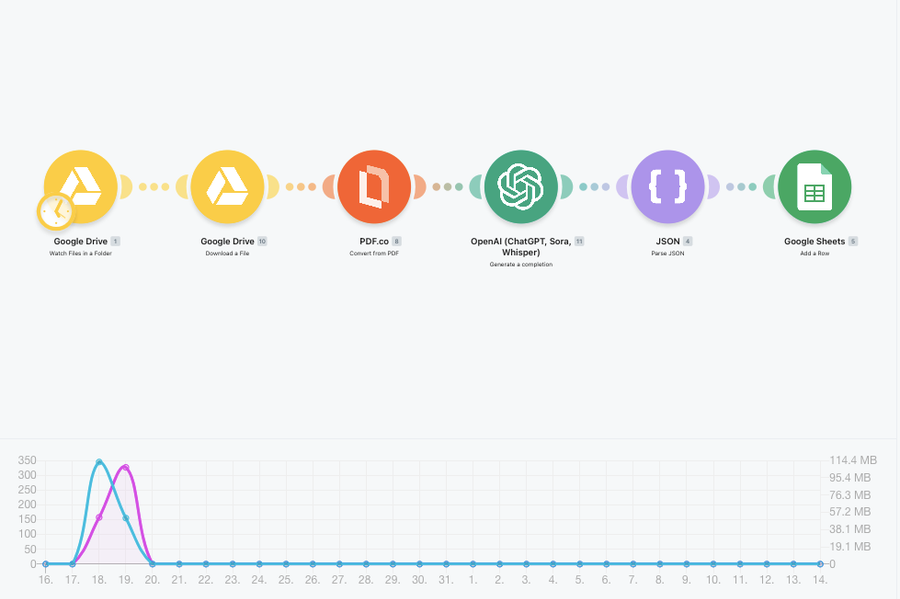
A Make scenario handles the full pipeline from PDF to structured spreadsheet row, ready for import.
Step 1: Watch the folder
A Google Drive module watches a specific folder for new files. When a PDF datasheet is uploaded, the scenario triggers automatically. The limit is one file per run, processing each datasheet individually.
Step 2: Download the file
The file is downloaded from Google Drive and passed to the next module.
Step 3: Convert PDF to text
PDF.co converts the datasheet to plain text. No layout, no formatting, just the content. This gives the AI a clean input without noise from PDF rendering.
Step 4: Extract structured data with AI
The text is sent to GPT-4o-mini with a system prompt that contains the complete extraction specification. The prompt was built specifically for Recab's content architecture and embeds the full taxonomy so the model classifies each product into the correct category without guessing.
The prompt enforces strict rules on every field. Part numbers must be extracted exactly as printed, not rewritten or described. Descriptions must meet character counts and write in a consistent voice. Application and feature arrays must be capitalised, deduplicated and length-limited. Specification labels must be single words. Category selection must match one of the allowed child terms from the taxonomy list, never a parent category, never an invented term.
For certifications, the prompt normalises variations: "CE/FCC Class A" becomes "CE Certified,FCC Certified". "EN50155:2017" becomes "EN50155". Unknown standards are flagged with asterisks so they can be reviewed rather than silently dropped.
The model returns only valid JSON with no code fences and no explanations.
Step 5: Parse and validate
The JSON response is parsed and each field is mapped to a column in the output.
Step 6: Write to Google Sheets
A row is added to the product import spreadsheet with all fields filled in: product name, part number, manufacturer, both descriptions, application joined with pipes, features joined with pipes, specifications in label::value format, category, tags, and the original datasheet link.
Step 7: Import to WordPress
WP All Import reads the spreadsheet and creates or updates product entries in WordPress, mapping each column to the corresponding JetEngine field. Products appear on the site with complete, structured, SEO-ready content.
The prompt as engineering
The system prompt that drives the AI extraction is the most important part of the build. It is not a generic instruction to "extract product information". It is a specification document embedded in an API call.
It contains the full Recab product taxonomy with every child and grandchild category listed. It contains the fixed list of allowed feature tags, form factor tags and certification standards. It defines character limits for every text field, array sizes for every list field, and the exact normalisation rules for certification variations. It handles edge cases: what to do when a product could belong to multiple categories, when a certification is close but not exact, when a standard is not on the list.
The result is that the model does not make taxonomic decisions. It follows the rules of Recab's content system and either places a product correctly or flags it for review.
Results
The automation ran against a folder of 400+ PDF datasheets. Products were extracted, classified, described and written to the spreadsheet without manual review for the majority of entries. The output was imported into WordPress and products went live.
Time to add a new product today: drop the datasheet into the folder and wait. The scenario runs, the spreadsheet updates, the import picks it up.
The same automation runs on new products as Recab's catalogue grows. When a manufacturer releases a new product and sends a datasheet, the pipeline handles it without any change to the process.
Six months after this automation was built, a second project replaced the Google Sheets step with a direct WordPress plugin that runs the same extraction inside the admin and imports in real time. That is documented in CASE-003.
The custom WordPress plugin that replaced the spreadsheet step is documented in CASE-003.
Key numbers
450+
products processed
20-30 sec
per product
0
manual data entry required
Complete
Status