
Recab AB · Industrial Electronics
CASE-001
Recab: AI Product Importer Plugin
A custom WordPress plugin that reads PDF datasheets with Claude AI, classifies products against Recab's full taxonomy, detects duplicates by hash, scrapes images and imports directly into WordPress. New products go from PDF to live in under two minutes.
| Client | Recab AB |
| Year | 2026 |
| Service | Custom Plugin |
| per batch | 20 PDFs |
| duplicate imports | 0 |
| certification standards supported | 90+ |
| Status | Live and in use |
The situation
CASE-002 describes the Make automation built to handle Recab's initial product import: 400+ PDF datasheets processed through Google Drive, PDF.co and OpenAI, with structured data written to a spreadsheet and imported via WP All Import.
That automation solved the initial migration. It did not solve the ongoing problem.
Every week, new products arrive. New datasheets from manufacturers land in inboxes. The catalogue grows. Under the Make setup, adding a new product meant: save the PDF to a specific Google Drive folder, wait for the scenario to trigger, check the spreadsheet, run the import. Four steps, involving two external services and a wait.
The team needed something simpler. Something that lived where they already worked.
The plugin
The AI Datasheet Importer is a custom WordPress plugin built specifically for Recab's content architecture. It installs directly into the WordPress admin and adds three tools to the product management interface: a bulk upload screen, a single-product import panel in the post editor, and a CSV import/export system.
The plugin connects to the Claude API. It sends each PDF as a base64-encoded document and receives structured product data back. It then maps that data to Recab's JetEngine fields, assigns the correct taxonomy terms and creates a draft product ready to review and publish.
How it works
Single product mode
On any product's edit screen, a meta box appears in the sidebar. The team member drops a PDF onto it or clicks to browse. The plugin reads the file, hashes it for duplicate detection, encodes it and sends it to Claude with the full extraction prompt. Twenty to forty seconds later, the extracted data appears in a preview. Part number, manufacturer, both descriptions, features, specifications, certifications, category. All fields populated. The team reviews the preview, confirms and the product is created.
Bulk upload mode
A dedicated admin page accepts up to 20 PDF datasheets at once. Each is processed in sequence. The results are shown one by one as they complete. Duplicates are detected and skipped before the API call is even made.
Duplicate detection
Every PDF that enters the system is hashed using MD5. Before sending anything to Claude, the plugin checks whether that hash already exists in the database. If the same datasheet has been imported before, it is skipped and flagged. This means a team member can safely re-upload a folder of datasheets without creating duplicate products.
Taxonomy matching
The plugin contains the complete Recab taxonomy as reference data: every product category and its slug, every certification standard, every feature tag, form factor tag and manufacturer name. The extraction prompt instructs Claude to return exact taxonomy slugs, not names. When the response arrives, the plugin maps each slug to the correct WordPress taxonomy term and assigns it directly. No guessing, no manual selection.
For manufacturers, fuzzy matching handles variations. If Claude returns "Lumberg" and the taxonomy has "Lumberg Automation", the plugin matches them. Belden-branded products receive additional handling since Belden distributes through multiple sub-brands.
Image scraping
After a product is created, a button in the product sidebar triggers image scraping. The plugin uses the product name and manufacturer to search for images on the manufacturer's website via ScrapingBee and attaches the best match to the product gallery. This handles the one step that the AI extraction cannot do from a PDF alone.
CSV export and import
All products can be exported to a CSV at any time. The export includes every field: JetEngine meta, taxonomy assignments, SEO fields and image references. The same CSV can be re-imported through the CSV import tool, with field-level control over which columns to update. This enables bulk edits, catalogue backups and migrations between environments.
Import log
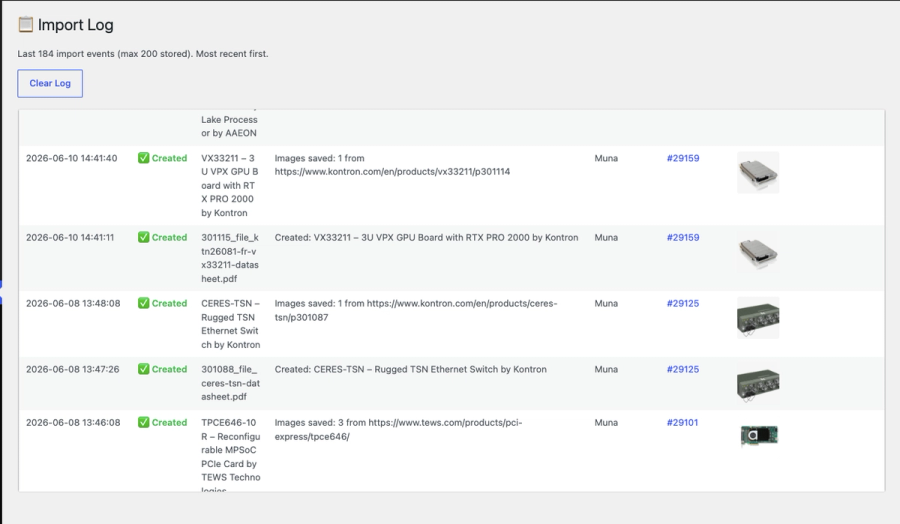
Every import is recorded: filename, timestamp, status and product ID. The team can see exactly what has been imported, when and whether it succeeded.
The prompt as architecture
The extraction prompt embedded in the plugin is not a simple instruction. It is a specification document that encodes Recab's entire content system as a set of constraints the AI must follow.
It contains all product category slugs across three hierarchy levels. It contains 90+ certification standards with their exact WordPress taxonomy slugs. It contains feature tag names, form factor tag names, manufacturer names and data rate values. It defines character limits for every text field, array lengths for every list, and normalisation rules for certification variations.
The model is not asked to decide how to classify a product. It is given the complete classification system and told to apply it. The result is that the output is always in the format WordPress expects, with the slugs the taxonomy uses, and in the structure JetEngine can read.
When a new certification standard needs to be supported, the prompt is updated. When a new manufacturer is added as a partner, their name and slug are added to the reference data. The plugin grows with the catalogue.
What this replaced
Before the plugin, adding a new product required: exporting the PDF to Google Drive, triggering the Make scenario, waiting for the run, checking the Google Sheets output, running WP All Import, then manually adding product images.
After the plugin: drop the PDF into the product editor, review the preview, click confirm. Images are fetched with one more click. The product is live in under two minutes.
Results
The plugin is installed on the live Recab site and in active use. New products from manufacturers are added directly through the bulk upload interface. The team does not need access to external tools or spreadsheets.
The catalogue is maintained by the Recab team independently. The plugin handles extraction, classification, taxonomy assignment and deduplication. The team handles review and publish.
Zero external dependencies for ongoing product management.
This plugin is the third project in an ongoing engagement that began with a full website rebuild (CASE-001) and continued with the initial product import automation (CASE-002).
Key numbers
20 PDFs
per batch
0
duplicate imports
90+
certification standards supported
Live and in use
Status